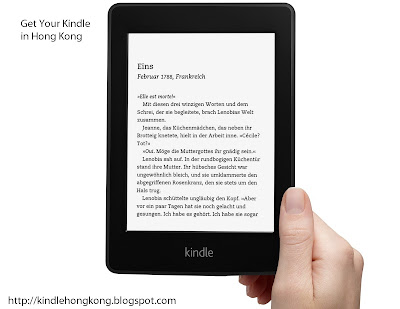
Thinking of getting a Kindle Paperwhite in Hong Kong and is it possible to buy Kindle Paperwhite in Hong Kong? Yes,it is possible to order from Amazon US and get your very own
Kindle Paperwhite in Hong Kong. Here's the easiest and cheapest way to get a kindle Paperwhite in Hong Kong. 香港終於可以買Kindle Paperwhite 電子書!
Which Kindle Paperwhite should I buy in Hong Kong?
All Kindle Paperwhite readers do work perfectly in Hong Kong, including those with special offers.
- Kindle Paperwhite is the latest Kindle which is available right now. It has a built in light, a touch screen, higher resolution and a higher contrast touchscreen and most importantly a longer battery life (8 weeks with wireless turned off). Now you read anywhere even without proper lighting.
- Kindle Paperwhite 3G has additional 3G connection which allow you to download e-books without WiFi connection. 3G is free in over 100 countries. It's perfect for travelers or those who love convenience.
- Kindle Paperwhite with special offers
comes with advertisement, so it has lower price. Ads will be displayed
as screensaver and on bottom of home screen. It works just like the
ad-free version in Hong Kong.
- Kindle Paperwhite 3G with special offers
comes with advertisement, so it has lower price. Ads will be displayed
as screensaver and on bottom of home screen. It works just like the
ad-free version in Hong Kong.
You may need to look around the
U.S. kindle store and see how people are saying about them before choosing your kindle.
How to buy a Kindle Paperwhite in Hong Kong
To buy a Kindle Paperwhite from Hong Kong, you need to order it from amazon.com and have it delivered to an U.S. address first. Then we will use an international mail service to ship it to Hong Kong. Such service is available at Vshub, Comgateway or Borderlinx.com.
Here's a step by step guide to help you buy a Kindle Paperwhite in Hong Kong:
1. First, go to
Borderlinx.com (currently Borderlinx is offering 25% off your first shipping) and create an account. You'll get a virtual U.S. address once you have registered.
Example of a virtual U.S. Address (Do not use the above address, register an account at Borderlinx to get your own)
2. Go to Kindle Paperwhite for U.S. shipping page
3. Add your kindle touch to shopping cart. I also recommend buying kindle touch accessories from amazon.com because they are not easy to find in Hong Kong. So browse the Kindle accessories store first.
4. Proceed to check out. At this step you have to enter your Borderlinx US address as the shipping address. Billing address can be your real address in Hong Kong. And you can make a payment your Hong Kong credit card.Your Kindle Paperwhite will be delivered to Borderlinx shortly, depending on shipping speed you prefer. There are four shipping options available
- Amazon Next Day Shipping
- Amazon Two Day Shipping
- Amazon Standard Shipping
- Amazon Super Saver is Free (Choose this to save on additional shipping fee)
5. When your Kindle Paperwhite arrive at Borderlinx, the company will send you a confirmation email. Confirm your items, and wait for your kindle touch to arrive in Hong Kong!
Notice: You might want to add in a power adapter as the power adapter is not included in your Kindle Paperwhite or Kindle Paperwhite 3G
How much does it cost?
You can use a total cost calculator over at Borderlinx to estimate the price. For Kindle Paperwhite, enter the values displayed below.
If you have any questions about Borderlinx,
live support is here to help.
What other customers whom have bought Kindle Paperwhite are saying:
The following feedback are from customers whom have bought
Kindle Paperwhite and Paperwhite 3G at Amazon Store
Pros of Kindle Paperwhite:
- Michael Gallagher: "Reading at night is a good experience with the lighting display in
comparison to the other versions of Kindle because you don't need an
additional light that can get in the way: it didn't disturb, for
example, my wife who likes to watch TV in a dark room. It was also very
convenient on a plane ride at night as I was able to see the full page
of the text vs. a light attachment only reaching most of the screen:
there are no impediments to the reading screen."
- Scott: "The Kindle Paperwhite is definitely upgrade-worthy for all previous
kindle users who read more than a few books a year. A stunning display,
better touch sensitivity, and software features that Amazon should have
come out with years ago, finally make the Kindle the undisputed leader
in the e-reader market. Previously I would go back and forth between my
Kindle Touch and Fire when reading books, but the Paperwhite is such a
pleasure to use that I can't imagine ever choosing the Fire over it
again. If you are an avid reader and have never purchased a Kindle
before, the Paperwhite will really give you an appreciation for how far
these devices have come."
- Phil: "I wanted a simple and inexpensive e-book reader. This Kindle Paperwhite
has many capabilities beyond what I need and I'm sure that as I get used
to it, I will find myself taking advantage of them from time to time
(web browsing, for example). It does not have audio capability nor was I
looking for that. This Kindle does exactly what I want, it works well,
and is very elegant and well made. I am very happy with my purchase and looking forward to many years of enjoyment."
Cons of Kindle Paperwhite:
- Scott: "No Power adapter. It comes with a micro-usb charging cable, but you have to have a computer or already own a power adapter from another product to be able to charge it. Amazon did this with the Touch as well and I think it is absolutely ridiculous. I know Amazon wants to charge separately for this but I think not including one is really greedy. If you need one, you may want to buy the Kindle Power Adapter although I'm sure you could probably find a much cheaper one somewhere."
- Ben Silber: "I haven't seen a lot of people talking about the battery life in their
reviews, so I wanted to make this a point in mine. The battery is good.
SO you're asking "why is it in the cons?" Well, the answer is it's
not great. I had left my KK alone for months at a time without the
battery even going past 25% battery left."
- Tyler: "The downsides of this device are few and far between. The chief amongst
them, for me, is the lack of page turn buttons. Leaving the buttons out
was, most likely, a move to cut costs. While I cannot abide by folks who
say "Just tap the screen and keep your hands clean," I find that this
lack of buttons is far outweighed by the positives this device brings to
the table."
Recommended Accessories to get for your Kindle Paperwhite
The following accessories are highly recommended by other customers like yourself whom have bought
Kindle Paperwhite and
Kindle Paperwhite 3G at Amazon Store.
Here's a quick overview review video on Kindle Paperwhite
I hope this article helpful for you and do feel free to share this on Facebook. If you have any questions or suggestion, please leave me a comment.
Technical Specifications of Kindle Paperwhite 3G

| Display | Amazon's 6" Paperwhite display with patented built-in light, 212 ppi, optimized font technology, 16-level gray scale |
| Size | 6.7" x 4.6" x 0.36" (169 mm x 117 mm x 9.1 mm) |
| Weight | 7.8 ounces (222 grams) |
| System Requirements | None; fully wireless and doesn't require a computer to download content |
| On-Device Storage | 2 GB internal (approximately 1.25 GB available for user content). Holds up to 1,100 books |
| Cloud Storage | Free cloud storage for all Amazon content |
| Battery Life | A
single charge lasts up to eight weeks, based on a half hour of reading
per day with wireless off and the light setting at 10. Battery life will
vary based on light and wireless usage |
| Charge Time | Fully charges in approximately 4 hours from a computer via USB cable |
| 3G Connectivity | HSDPA
modem (3G) with a fallback to EDGE/GPRS; utilizes Amazon Whispernet to
provide wireless coverage via AT&T's 3G high-speed data network in
the U.S. and partner networks outside of the U.S. |
| Wi-Fi Connectivity | Supports
public and private Wi-Fi networks or hotspots that use the 802.11b,
802.11g, or 802.11n standard with support for WEP, WPA and WPA2 security
using password authentication or Wi-Fi Protected Setup (WPS) |
| Content Formats Supported | Kindle
Format 8 (AZW3), Kindle (AZW), TXT, PDF, unprotected MOBI, PRC
natively; HTML, DOC, DOCX, JPEG, GIF, PNG, BMP through conversion |